Your CRM isn’t broken, but your team keeps spreadsheets beside it anyway. Here’s how to tell whether to configure what you have, switch products, or build a custom CRM system around how you actually work.
Your CRM isn’t broken, but your team keeps spreadsheets beside it anyway. Here’s how to tell whether to configure what you have, switch products, or build a custom CRM system around how you actually work.
We see the same thing in almost every first call. A company bought a CRM a few years ago to keep track of customers and enquiries. It worked for a while. Then, slowly, the workarounds crept in.
Sales started keeping a quoting spreadsheet on the side. Someone in operations began copying order details into a second tool. Every Friday, a manager rebuilds the pipeline report by hand, because the one the CRM produces isn't the one anybody actually reads.
Usually the CRM isn't the problem. The business has just grown past it, or the way the team works was never a great fit to begin with. And the cost is real. Salesforce's own research found sales reps spend just 28% of their week actually selling, and 66% feel buried under the number of tools they have to use.
So the question isn't really "which CRM is best?" It's whether you should keep tweaking what you have, move to a different product, or build a custom CRM system around the way your business already runs.
We build these systems for a living, so we'll be upfront: a custom build isn't the right call for everyone. Below is what a custom CRM actually is, how it works, what goes into the cost, and how to tell which side of the line you're on.
A CRM is where your customer information lives. Contacts, enquiries, calls, emails, quotes, deals: it keeps them in one place and tells you what's happening with each opportunity and who's meant to act next.
A custom CRM system does the same job, but its shape comes from your business instead of a generic sales template. In practice, four parts get built to fit you.
People mix these up all the time. Customizing means taking a product like Salesforce, HubSpot or Zoho and bending it: new fields, renamed pipeline stages, a few add-ons. Building custom means the software is written for your business, on code you control or own.
There's a middle path too. Sometimes the smartest move is a custom piece that sits on top of your existing CRM, like a quoting tool or a customer portal that syncs with it.
On paper, a custom CRM can do anything software can do. In reality you're limited by three things: budget, the architecture you pick, and your ability to look after what gets built. Every feature you add is one you'll be maintaining for years, so it's worth being picky.
Here's a simple example. A building-materials supplier gets enquiries by phone, email and its website. Each one needs a stock check, a quote, a follow-up and, if the customer says yes, an order. With a standard CRM, stock lives in one system and quotes live in spreadsheets. A custom CRM can hold all four steps in a single record, so nobody re-types anything and nothing slips through.
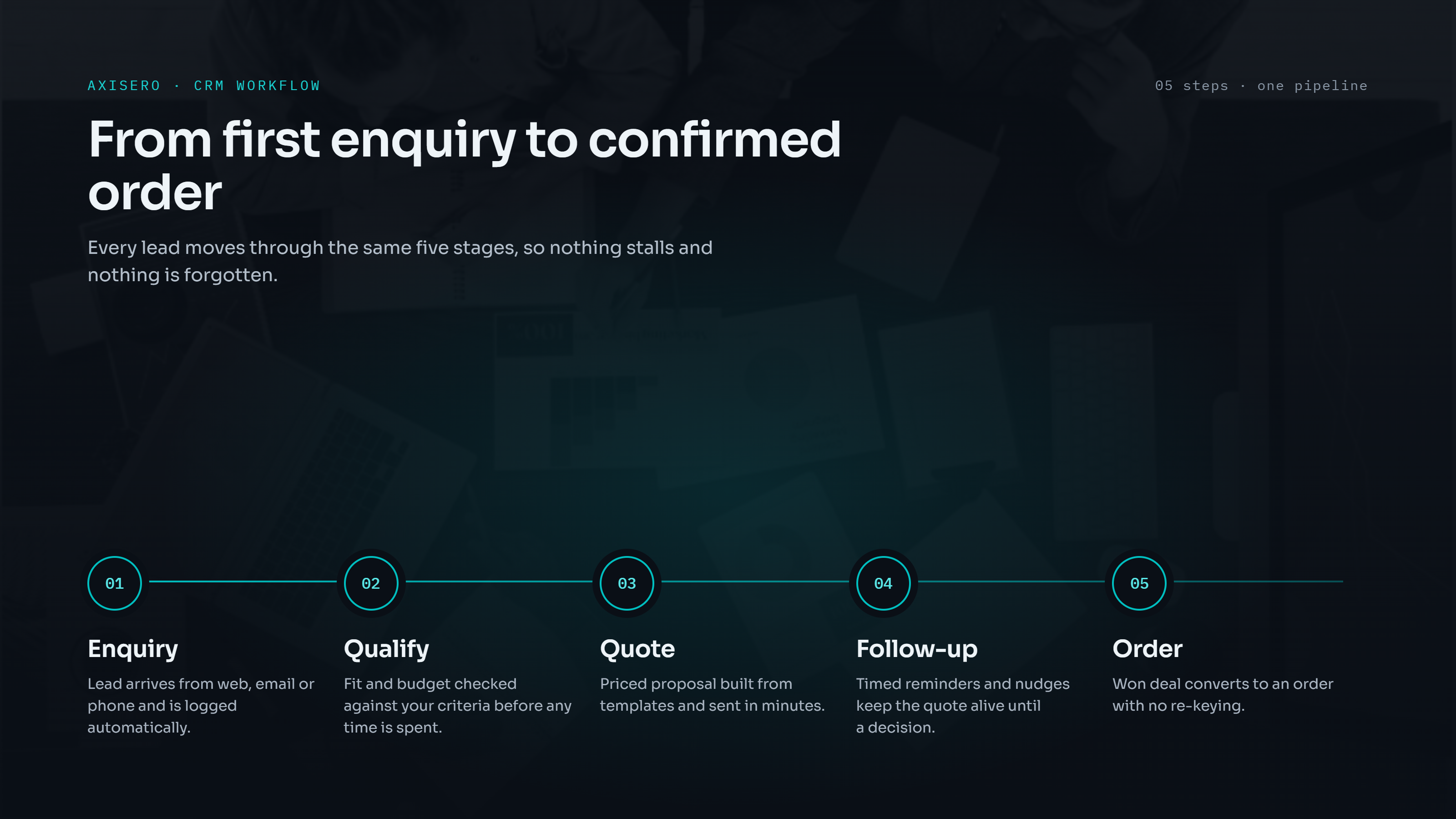
The easiest way to get it is to follow a single enquiry through the system, and to notice where things tend to go wrong when there isn't one.
The enquiry comes in. A web form, an email or a phone call creates a record on its own. Without that, someone copies details out of an inbox into a spreadsheet. Or forgets to.
It gets qualified. The system checks it against your rules (location, budget, product type) and hands it to the right person. Without that, leads sit with no owner for days.
A quote goes out. The rep builds it inside the record, using live prices and stock. Without that, the quote lives in a separate file, and the CRM never learns what the deal is worth.
Someone follows up. If the customer hasn't replied after, say, three days, a task pops up for the rep. Without that, follow-up depends on whoever remembers.
It becomes an order. An accepted quote turns into an order and goes straight to operations or accounts. Without that, the same details get typed into another system, usually with a mistake or two.
That flow rests on a handful of building blocks.
Every customer gets one record: contacts, documents, notes, past orders, every email and call. When someone new picks up the account, they see the whole history, not just their slice of it.
Deals move through stages that match how you actually sell. Each stage can come with its own required steps and deadlines, so an enquiry can't just quietly go cold.
Simple rules handle the next step. A qualified enquiry gets assigned. A big quote asks a manager for approval. A signed order pings the warehouse. The point is fewer hand-offs that depend on someone's memory.
A custom CRM can talk to your email, accounting, inventory and ERP tools, usually through their APIs. That still takes real engineering work, but the connection is built around your data instead of a one-size-fits-all connector.
AI earns its place when it helps with a specific step. Summarizing a long email thread before a call. Pulling the key details out of an incoming enquiry. Letting staff search old projects in plain language. Gartner found sellers who work well with AI tools are 3.7 times more likely to hit quota. But AI bolted on for the sake of it just adds cost. We always start with the workflow, then look for where AI saves real time.
Think of a custom CRM as a set of modules. You pick the ones you need and skip the rest. The usual menu looks like this:
You won't need all of it. A ten-person contractor might only want customer records, quoting and follow-ups. A distributor with several branches might need inventory links, approvals and detailed reporting. The right scope comes from your operations and your people, and from the specific problem you're trying to fix.
Let's be clear about one thing first. Salesforce, HubSpot and Zoho CRM are good products, and plenty of businesses are better off with one of them. Custom isn't automatically cheaper, and it isn't automatically better. Here's how the two really compare.
There's one thing that matters more than any feature list: whether your team actually uses the thing. Research firm Johnny Grow found 55% of CRM rollouts didn't hit their planned goals. That risk applies whichever way you go. A custom build only pays off if it's designed around how people really work, and introduced with proper training.
One of these signs on its own probably isn't enough. But if several sound familiar, it's worth looking seriously at a custom CRM solution:
The tool overload is more common than people admit. Gartner found half of B2B sellers feel overwhelmed by the amount of technology their job requires, and those sellers are 45% less likely to hit quota. Sometimes fewer, better-connected tools do more good than any shiny new feature.
Here's how an operations manager at one of our clients, an industrial company, put it:
Our order process was spread across email, spreadsheets, and accounting software. Axisero built a custom system that connected the workflow end to end. Now the team works from one clean operational view.
They didn't need more features. They needed one connected workflow instead of three tools that didn't talk to each other.
We'd rather say this upfront than after a project starts. You're likely better off without a custom build if:
Honestly, it depends on what you need the system to do.
A CRM that runs one simple sales pipeline is a very different job from one that ties together sales, quotes, inventory, accounting and day-to-day operations. What shapes the investment is mostly this:
But "how much does it cost to build?" is only half the question. The other half is whether it fixes the right problems, and whether that's worth more to you than it costs.
That's why the work should start with clarity, before any code is written. Pin down the workflows, the functionality, the integrations and what a good outcome looks like. Then both sides have something solid to base the scope and the price on.
Most CRM projects that go wrong do so for the same reason. They try to build everything at once, around a process nobody ever wrote down. Here's the approach we'd recommend, whoever you work with.
Map how things work today. Follow a few real enquiries from first contact to payment. Write down every tool, spreadsheet and hand-off along the way.
Find what's costing you most. Which steps lose deals, cause delays, create errors or eat hours of re-typing?
Pick the smallest set of modules that fixes those. Everything else can wait.
Write down integrations, data and access. Which systems need to connect, what data moves where, and who gets to see what.
Plan a first release, not the whole platform. Get something useful live, then build on it.
Test it with the people who'll use it. Use real scenarios, and do it before launch rather than after.
Measure what changes. Track whether people are using it and whether the problems you set out to fix are actually getting better.
Good measures are concrete and easy to check: fewer duplicate entries, more follow-ups done on time, less admin, and a pipeline report nobody has to build by hand anymore. And if anyone promises you a specific percentage improvement before they've seen how you work, be careful.
A regular CRM is a finished product that you configure within its limits. A custom CRM is built around your business, so you decide how the data is structured, how the workflows run and where the system goes next.
In most cases, yes. Most modern accounting, ERP, inventory and email tools have APIs a custom CRM can connect to. How easy it is depends on what each tool supports, so check this early, during planning.
Not automatically. It depends on what you need, your budget, what existing products already cover, and whether you're able to look after custom software. If your sales process is fairly standard, an established platform is often the smarter choice.
That depends on the scope, the integrations, how much data needs moving and how complex the work is. A first release built around one core workflow can be ready in a few weeks. A full platform with lots of modules and integrations takes months.
That's down to your contract. Make sure data access, intellectual property, source-code rights, hosting and handover are all written into the agreement before any work starts.
Yes. Common uses include summarizing customer conversations, pulling details out of emails and documents, and helping staff find information faster. To work well, AI needs clean data, a person checking its output, and a clear way to tell whether it's actually saving time.
If you strip it all back, the decision comes down to three questions.
Whichever way it goes, start with your process. The software comes second.
If you're not sure which side you're on, that's exactly what our first conversation is for. At Axisero, we build custom CRM and ERP systems around the way each business actually works. Every project starts with a written specification and is built as a fixed-price, fixed-scope sprint. You get the full source code at handover, with no per-user licence fees and no lock-in.
Book a 30-minute audit and walk us through how your team handles enquiries, quotes and follow-ups today. We'll tell you straight whether you need a custom CRM, an integration project, or just a better setup of the tool you already have.